 Stuart Kerr Spindlow
Which workflow automation tool should you choose?
For a small team connecting several project tools, Make is my starting choice when the workflow needs branching and a named owner can maintain it. Choose Zapier when its available triggers and actions express the job cleanly. Shortlist n8n Cloud when a technical owner needs more control over data and logic.
First ask whether the work needs a separate automation service at all. If the request, task and handoff can stay in your existing ClickUp or monday workspace, try its native automations before adding another subscription and another set of credentials. A reliable manual handoff can also be the right answer at low volume.
This guide covers project intake, approvals and delivery handoffs. It does not rank CRM, marketing orchestration or autonomous agents. The five choices below represent different operating situations, rather than a universal first-to-fifth league table.
| Choose | Best starting situation | Main constraint | Read the assessment |
|---|---|---|---|
| Make | Branching handoffs between apps | An operator must understand mappings, credit usage and recovery | Make: visual routing |
| Zapier | A supported trigger-and-action sequence | Multi-step workflows require a paid plan; verify the exact actions | Zapier: standard handoffs |
| n8n Cloud | Custom logic with a technical owner | Execution allowance, Cloud code limits and maintenance responsibility | n8n: technical workflows |
| ClickUp Automations | Delivery already lives in ClickUp | Conditions and action allowances depend on the plan | ClickUp: native task work |
| monday automations | Requests and coordination already live on monday boards | Separate automation and integration action budgets | monday: native board work |

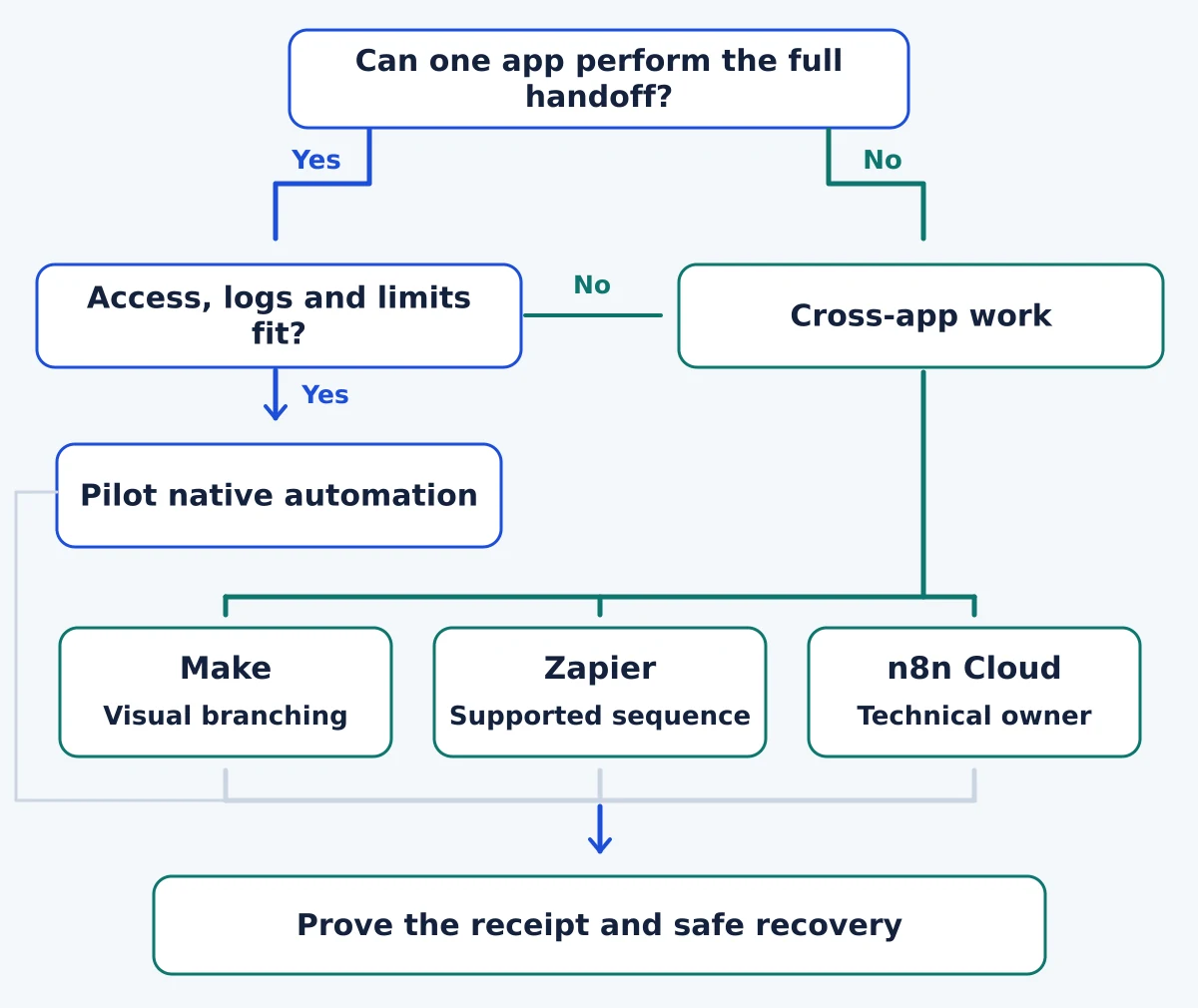
Read the diagram as text
- Native first: Use the existing app when it performs the complete handoff and access, logs and limits fit.
- Cross-app: Make for branching; Zapier for a supported sequence; n8n Cloud for custom logic with a technical owner.
- Shared gates: Prove the destination receipt and a safe recovery path.
How I choose for a small project team
I use the same four questions for each option: can it perform the required handoff, can the team recover from failure safely, can someone else operate it, and can the team explain its full cost? An essential failure rules a product out; extra connectors or an attractive interface do not compensate for it.
- Workflow fit: verify the exact trigger, fields, permissions and destination action. An app appearing in a catalogue does not prove that your particular update or attachment is supported.
- Recovery and access: find the run history, identify the last confirmed action and establish who can fix an expired credential or uncertain result. Keep a stable request ID and destination receipt.
- Operating effort: ask the future owner and a backup to explain the flow. Include handover, monitoring and changes to source fields, not just initial setup.
- Whole cost: include the feature tier, usage allowance, required app subscriptions and operator time. Credits, tasks, executions and native actions are different units.
The recommendations are qualitative editorial judgments based on these requirements and the current product documentation. They are not measured speed or reliability scores. Use the software evaluation scorecard to record your own must-pass checks.
Make: my starting choice for visual branching
Make suits a handoff where different requests take different paths and the operator needs to inspect those paths together. For example, an approved request can become a delivery task, while an incomplete request returns to its reviewer. The value is the explicit mapping and routing, provided someone understands the whole scenario.
The Make plan table includes routers and filters on Free, with 1,000 monthly credits, two active scenarios and a minimum 15-minute scheduled interval. That makes a bounded pilot plausible. It does not make frequent polling or a busy multi-action process free.
Most standard operations consume one credit, while some advanced features use different rates. Polling and records passing through downstream modules can add usage. Start with the actual schedule and number of operations in Make’s credit guidance, rather than treating one request as one credit.
Choose it when a named owner can maintain the mapping, filters and exception path. Pass when nobody can explain an incomplete run or the required action is missing. A visually clear canvas still needs an operating procedure.
Use our Make and ClickUp intake walkthrough for the field contract and recovery checks, or Make vs Zapier comparison for the same-job cost model.
Zapier: a strong candidate for a supported sequence

I would shortlist Zapier when the team can express the handoff as an existing trigger followed by familiar actions. A small sequence that a backup colleague can read is often preferable to a more flexible design that only its builder understands. Check the specific event and fields before deciding that the integration catalogue covers the job.
Zapier’s Free-plan documentation lists 100 tasks a month, one user and two-step workflows: one trigger plus one action. A process that marks a request as Processing, creates a task and writes back its receipt needs a multi-step paid plan. Do not build the purchase decision around trial-only functionality.
For budgeting, Zapier’s task-usage guidance counts successful actions and excludes triggers, but the public rates table uses conflicting wording for standard trigger steps. Confirm your account’s accounting before fixing a per-request budget; the discrepancy remains unresolved as of 12 October 2026.
Choose it when the exact supported sequence is understandable to its future operator. Pass when missing actions, extra lookups or elaborate recovery logic remove that simplicity. Replaying a run can repeat successful work, so a clean first run is only part of the evaluation.
Read the Make vs Zapier comparison for matched approval-and-receipt requirements. It is a comparison, not a standalone Zapier review.
n8n Cloud: for a technical workflow owner

n8n Cloud is my alternative when a technical owner needs to transform data, inspect workflow logic or connect an API-based step. Cloud removes the need to run the n8n server yourself. It still leaves the team responsible for credentials, business rules and the outcome of each handoff.
The current Cloud plans bill for workflow executions rather than individual steps. Starter lists 2,500 monthly executions and one shared project; Pro lists 10,000 and three. At the displayed annual commitment, their monthly equivalents are €20 and €50 respectively. Confirm tax, currency and the selected allowance before purchase.
Cloud is not interchangeable with self-hosted n8n. The Code node documentation limits Cloud JavaScript imports to the supplied crypto and moment modules; Cloud Python cannot import libraries. A design that depends on another package needs a different supported approach or a hosting decision.
Choose it when a technical owner can maintain and explain the workflow, including errors and access. Pass when the team expects hosting to remove all operating work. A longer workflow can fit execution billing well, but retries, schedules and separate runs still matter.
See the full n8n Cloud review and Make vs n8n comparison. Use Cloud vs self-hosted n8n if server responsibility is part of the decision.
ClickUp Automations: start here if delivery already lives in ClickUp

An existing ClickUp team should first test whether native task automation can handle assignment, state changes or another required handoff inside the workspace. Avoid maintaining an external copy of a task just to move work between states. Native automation is a narrower choice than a general connector platform, which can be an advantage when it covers the job.
ClickUp’s automation limits list 100 monthly actions on Free, 1,000 on Unlimited and 5,000 on Business. Conditions require Business or above. Check both active-automation limits and action consumption; access to an automation feature does not imply unlimited monthly usage.
Choose it when the task is already the source of truth and the required trigger, condition and action exist on your plan. Pass when the important work spans systems and cannot be expressed by the available integration or native actions. Do not upgrade the whole workspace until you compare the seat cost with the alternative.
Read the full ClickUp small-team evaluation for permissions, export and buying checks, and the ClickUp backlog setup guide for the underlying task structure.
monday automations: for a board-led request process

For a team already coordinating requests on monday boards, native automations deserve a pilot before an external orchestration service. Keep the request, owner and visible status together when that arrangement is sufficient. This recommendation concerns project work management, not a separate CRM purchase.
The automation and integration allowances start on Standard: 250 automation actions and a separate 250 integration actions each month. Pro provides 25,000 in each category. These are two budgets, not one pool of 500 or 50,000 interchangeable actions.
Seat packaging also matters. The plan guidance starts paid teams at three seats and then uses bundles; a six-person team can require a ten-seat bundle. Check the exact product and workspace quote rather than multiplying a headline per-seat price by your headcount.
Choose it when the board-led intake process and required recipes suit the team. Pass when a small action allowance, required upgrade or external dependency changes the economics. Count multi-action recipes against their relevant allowance before calling an existing subscription sufficient.
Read the full monday work management evaluation and monday project-request workflow to check the broader fit.
Budget from the workflow, not the allowance headline
Write down how requests arrive, how often the workflow checks for them, which actions run for each accepted request and what happens after a failure. Then translate that design into each candidate’s billing units. Do not put a thousand credits beside a thousand executions and assume equal capacity.
For example, suppose a native board workflow performs three chargeable automation actions for each of 120 accepted requests. That is 360 actions before reminders or recovery. It exceeds monday Standard’s 250 automation-action allowance even if all 250 integration actions remain unused. This is an illustrative calculation, not an observed account bill; verify which actions the chosen recipe actually charges.
Compare the required plan at the same billing commitment and currency, then add setup and monthly support time. The SaaS cost calculator can hold those assumptions. Prefer an existing suitable platform when adding another would save little manual work but create a new maintenance duty.
A pilot that can change the decision
Use one fictional project request and the same acceptance checks for the serious candidates. Keep real customer data out of an exploratory workflow until access and data-handling requirements are agreed.
- Complete the normal handoff. Record the approved request version and the destination task ID or receipt.
- Change the request after approval. Confirm that changed work cannot silently inherit approval.
- Submit it twice. Establish how the design prevents or detects duplicate destination work.
- Interrupt the receipt step. Make the operator find out whether the task exists before trying creation again.
- Hand it to a backup. Check whether that person can find the history, explain the usage and recover safely.
Keep the pilot small enough to inspect every outcome. The two-week software pilot plan provides a fuller acceptance record. If no candidate passes the essential checks, fix the handoff contract or keep a controlled manual process rather than choosing the least expensive failed option.
My final recommendation
Start with the native automation in an existing ClickUp or monday workspace when it can perform the whole job. For a new cross-app project handoff, I would pilot Make first when visible branching is useful and an operator is available. Choose Zapier instead when its supported sequence is the clearer fit; move n8n Cloud onto the shortlist when a technical owner needs its additional control.
Your deciding evidence should be a completed handoff, a recoverable failure and a cost model the team understands. Neither the largest connector catalogue nor the lowest starting price establishes those outcomes.
Choose a useful first workflow
Before buying, choose the handoff you need to improve. Our project workflow automation examples compare intake, review reminders, overdue follow-ups, dependency alerts, status digests and completion checks, with an owner and stop condition for each.
Assess Make before committing
For a separate purchase decision covering ownership, usage budgeting, recovery and exit, read the Make.com review for project workflows.