 Stuart Kerr Spindlow
This review assesses Make as the coordination layer between project tools. It is for approved intake, delivery handoffs and recurring review work. It is not a recommendation to replace your project system or automate approval simply because an integration exists.
Where Make earns its place
The best candidate is a repeated transfer with an authoritative source, an explicit eligibility rule and a verifiable destination. For example, an accepted request should create a delivery task, preserve its permanent reference and return a receipt. If a form can already submit directly into the right project queue, adding a separate integration may increase the number of things your team must maintain.
My selection priorities are complete workflow fit, recoverability, operator access, understandable usage cost and portability. These are qualitative assessments. I would apply the same gates to an alternative; an attractive subscription or a long connector catalogue cannot compensate for a failed essential requirement.
| Criterion | Assessment | Decision-changing limit |
|---|---|---|
| Workflow fit | Strong candidate for explicit cross-app mappings and branches | Verify the exact trigger, action, fields and source-app permissions |
| Recovery | Useful controls when deliberately configured | An uncertain external write needs reconciliation before another creation attempt |
| Ownership | Suitable with a named maintainer and backup | Do not assume a shared login or a successful personal connection proves team access |
| Cost clarity | Can be estimated from a defined workload | Credits, polling, fan-out, AI and recovery can change actual use |
| Portability | Blueprints preserve scenario structure | Connections and the business operating record need separate handling |
This is a buying judgment rather than a measured reliability benchmark. I would keep a manual handoff when volume is low, ownership is unsettled or the receiving tool cannot expose a reliable completion receipt.
Evaluate one complete workflow
Use the Make and ClickUp project-intake walkthrough as a concrete starting design, then adapt it to your actual roles. This review answers whether Make belongs on the shortlist; that guide covers the implementation contract. Keep the source request ID, approved version, destination task identifier and last completed step together.
A connector being available does not prove that it can perform your exact action under the intended account. Check custom-field types, empty values, pagination and access to the destination list. If a required relationship or attachment cannot be preserved, record that as an essential failure rather than hiding it behind a generic integration tick.
Separate eligibility from submission. A request arriving in a form is not approval to create committed delivery work. Before a delayed action, read the current source again: an owner may have rejected or amended it. Keep requested dates distinct from deadlines the delivery team actually accepted.
Recovery matters more than a successful demo
Make’s incomplete executions documentation describes storage and retry of unfinished runs. The setting is disabled by default. Enable the appropriate recovery design deliberately and confirm its storage allowance; do not describe a default scenario as protected merely because the feature exists.
The scenario settings also allow processing runs in order. With ordering enabled, unresolved incomplete executions can hold later runs. That can preserve order but create a queue that needs attention. It does not coordinate other scenarios, human writers or the destination service as one transaction.
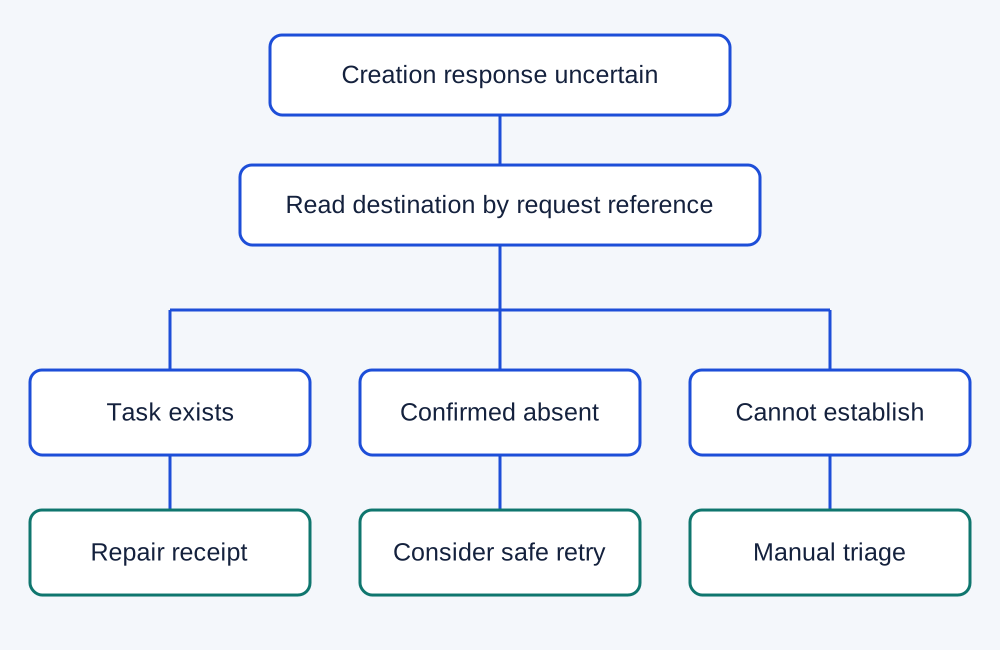
In a fictional request DEMO-041, task creation succeeds but the response is lost. Replaying the creation step could produce a second task. Search the destination for the permanent request reference, confirm the approved version and repair the source receipt when the task already exists. If the destination cannot be read confidently, stop and triage. A missing response is not evidence that nothing happened.
Define who sees the failure, how soon they should respond and what they may retry. Test both a rejected input and an uncertain output. A silent retry is a poor substitute for a documented operating decision, especially when the workflow sends messages, creates customer commitments or changes access.
Budget credits against the actual design
Make uses credits as its billing unit. Its credit documentation distinguishes fixed from dynamic use. Most ordinary non-AI operations use one credit, while some advanced or AI features use different rules. Do not multiply every visible module by a universal fixed price.
Count the work a representative record causes, then add scheduled checks, branches, iterated records and recovery. A router does not make all of its downstream work free. A workflow processing a list can execute downstream actions once for each returned item. The billable workload is therefore different from the number of business requests.
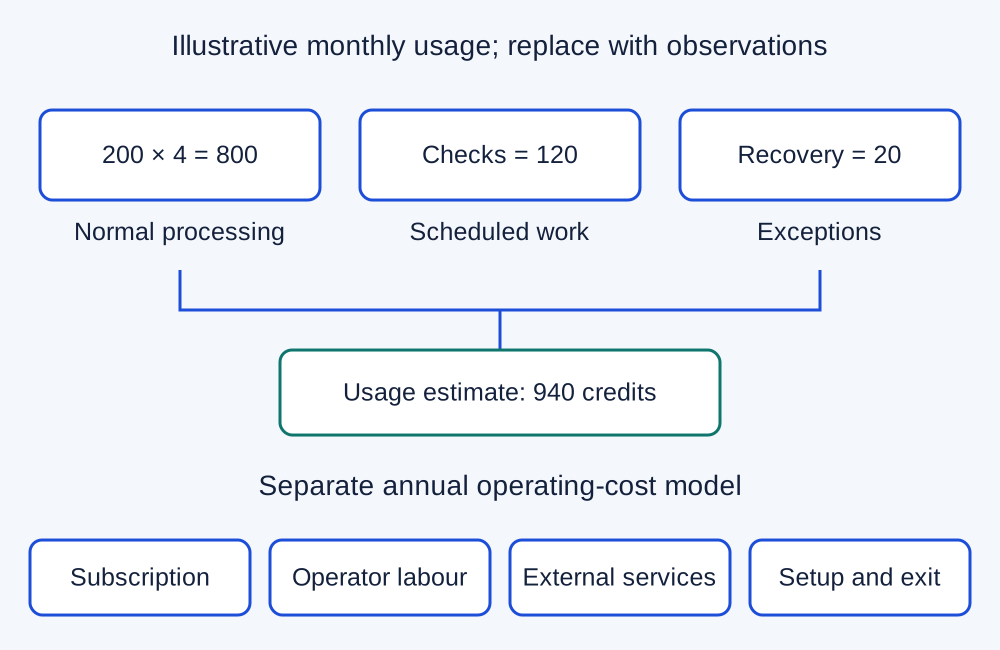
For an illustrative budget, suppose 200 accepted requests each cause four ordinary one-credit operations: 800 credits. Suppose scheduled checks add 120 credits and ten recovery cases add two credits each: another 20. The narrow estimate is 940 credits. This is sample arithmetic, not a measured Make workload or a promise that a particular plan covers the complete design.
Make’s current plan page should determine the actual tier, billing period and allowance you purchase. Check scheduling, required team controls, storage and overage behaviour as well as credits. Confirm the checkout currency and taxes. A free pilot is useful only if its behaviour and limits match the production plan you intend to keep.
In another fictional annual budget, a subscription allowance of £120, two maintenance hours per month at £30, and six setup hours at £30 produce £1,020 in year one: £120 + £720 + £180. These amounts are assumptions, not current supplier prices. Add external API charges, overlap and incident work separately in the SaaS cost calculator.
Make the workflow transferable
Choose an appropriate organizational owner for connections and billing. Record which operator can inspect runs, edit the scenario, change a connection and recover an incomplete execution on the intended paid plan. Confirm those abilities in a pilot with a backup account; one person being able to run the demo does not establish usable delegation.
Keep credentials out of diagrams, exported notes and sample downloads. Record credential ownership and renewal responsibilities without copying secrets. When access changes, check dependent scenarios before revoking the old connection. Maintain a safe pause procedure and a manual route for urgent accepted work.
Logging is another explicit choice. Make’s confidential-data setting limits stored payloads and therefore troubleshooting options. Retain only the operational evidence you need under your data rules. Do not promise that switching a setting removes data from every connected service or turns the integration into an end-to-end compliance solution.
Blueprints help, but they are not an exit plan
A scenario blueprint preserves modules, settings and mapped values. After import, account connections still need to be created. It is useful for documenting or reusing a scenario within Make; it is not a portable executable for every competing automation platform.
Keep the business record separately: source IDs, destination receipts, accepted versions, ownership and unresolved exceptions. Exporting a scenario does not automatically export the records it processed, attachments, permissions or an audit history suitable for your requirements.
Before migration, decide which system owns each event during the transition. Avoid leaving old and new workflows both writing to the same destination without deliberate coordination. Test a single bounded stream, reconcile its receipts and retain a rollback decision. Our software migration checklist provides the broader exit requirements.
When I would choose something else
- Choose the existing project tool’s native automation when the required trigger, conditions and action stay within it. Fewer services can reduce handover work, provided its plan and permissions pass your gates.
- Keep Zapier on the shortlist when its exact app actions and the team’s existing operating knowledge fit the task better. Use the Make versus Zapier comparison for that same-task decision; a headline allowance is not a complete cost comparison.
- Consider n8n Cloud when a technical owner needs more explicit transformation logic and can maintain it. The n8n Cloud assessment and Make versus n8n comparison explain the tradeoffs. Self-hosting introduces additional infrastructure responsibility.
- Keep the manual process when the approval rule is unstable, the volume does not justify setup or safe recovery cannot be established.
These alternatives are conditional, not a universal ranking. I would not move a working integration merely to obtain a different editor or a smaller advertised unit price.
The pilot that should decide the purchase
- Write the required outcome and permanent source reference before building. Define who authorises the action and which version that approval covers.
- Run an eligible request, a rejected request, a duplicate event, an amended request and a lost-response case with fictional data.
- Ask the backup operator to explain the last completed action and recover one controlled failure using the intended access role.
- Compare measured credit usage, queue behaviour and operator effort with your estimate. Record product plan, date, sample and actual outcomes.
- Accept only when the essential fields, permissions, receipt and safe recovery pass. Otherwise revise one bounded issue or retain the current process.
Use the software pilot plan to retain the decision. The checks above are proposed acceptance tests; they are not claims that I ran a new benchmark for this review.
My recommendation
Make is a sensible candidate when a small project team needs a visible cross-app workflow and can support it as an ongoing service. I would start with a reversible approved handoff, prove its receipt and recovery path, then choose the lowest current tier that passes the access and capacity requirements.
The main reason to decline is lack of operational ownership. A clearer source record, a native rule or a disciplined manual queue can be the stronger choice. Buy the workflow capability your team can maintain, rather than a canvas you hope will manage itself.