 Stuart Kerr Spindlow
Choose for the work
My recommendation is to shortlist Make when your project handoff needs visible routing, several mapped fields and an operator who can maintain the scenario. Shortlist Zapier when the team wants a conventional trigger-and-action workflow and its available actions fit the job with little extra logic. If the request process itself is unclear, fix that before choosing either platform.
I have used Make and Zapier. This comparison focuses on the same practical job: find an approved Google Sheets request, create its ClickUp task and return a receipt. It compares workflow design, documented capabilities and operating responsibility; the example is not a timed head-to-head test.
Neither product's entry price tells you what that working arrangement will cost. You need to account for the billing units, exceptions and the person who keeps the automation understandable.

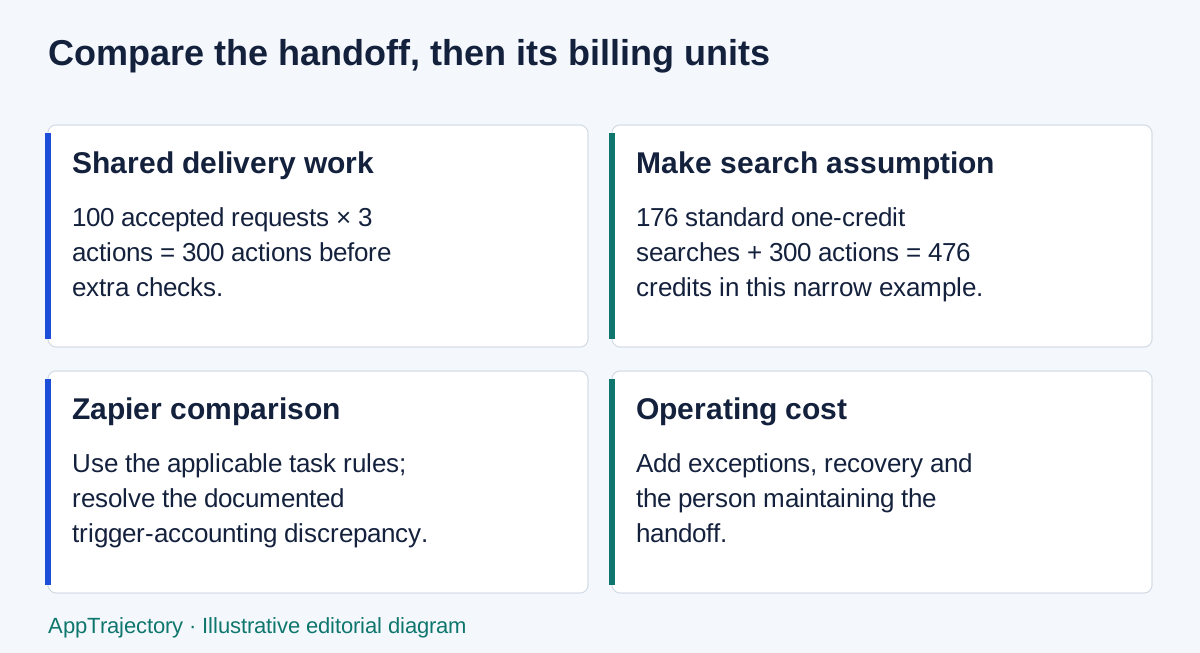
Read the diagram as text
- Shared delivery work: 100 accepted requests × 3 actions = 300 actions before extra checks.
- Make search assumption: 176 standard one-credit searches + 300 actions = 476 credits in this narrow example.
- Zapier comparison: Use the applicable task rules; resolve the documented trigger-accounting discrepancy.
- Operating cost: Add exceptions, recovery and the person maintaining the handoff.
Selection decision: fit, limits and checks
| Decision question | Practical answer |
|---|---|
| Best fit | Investigate Make for a branching handoff and Zapier for a supported event-and-action flow your team can maintain. |
| Poor fit | An unattended integration with unstable source fields, no accepted-version rule or nobody responsible for uncertain task creation. |
| Essential versus optional | Gate on trigger suitability, approval/version checks, receipts and safe recovery; connector count and visual preference are secondary. |
| Before purchase | Test approval after entry, a source edit, duplicate submission and a lost task receipt; model the actual workload using each platform’s accounting rules. |
| Alternative condition | Prefer the platform already maintained by your team when it passes the requirements. Keep low-volume handoffs manual when recovery and administration cost more than the saved work. |
These are editorial selection judgments based on this guide’s stated evidence and assumptions. They are not new hands-on results. Use the selection methodology and scorecard to preserve your own acceptance checks and evidence.
The short answer
| Your situation | My starting choice | What could change it |
|---|---|---|
| Several routes and mappings need to be inspected together | Make | The team has no available scenario owner or the required app action is missing. |
| A straightforward handoff matches existing Zapier actions | Zapier | Recovery or additional steps make the actual arrangement more complicated than expected. |
| The team already operates one platform competently | The existing platform | An essential capability or a properly costed constraint justifies adding another. |
| A few requests need manual judgement each week | Improve the current process first | Repeated copying or missed receipts becomes a material problem. |
These are editorial starting points, not measured claims that one product is faster or more reliable. Give both candidates the same acceptance checks before committing.
Compare one complete project handoff
Use a fictional request with a stable ID, title, required outcome, version and approval record. The delivery contract is:
- Do nothing until the reviewer approves that version.
- Mark the request Processing before attempting creation.
- Create a task in the fixed ClickUp List with the source reference.
- Write the task ID and URL back to the source request.
- Keep uncertain outcomes out of automatic creation until someone reconciles them.
The ClickUp task is the delivery record; the spreadsheet retains the request and handoff receipt. A successful run should not silently turn a requested date into a promised deadline or approve a changed request.
Keep the same accounts, sample fields, destination owner and review rules on both platforms. Compare the operator's work as well as the happy path. Can a backup colleague find a failed request and establish whether a task already exists?
The Make and ClickUp guide supplies the full field contract and recovery cases. Start with that common job rather than building two unrelated demos and comparing their screenshots.
Building the Make version

In Make, the example begins with a scheduled Google Sheets search for Approved and Ready requests that lack a task receipt. It validates the approved version, marks Processing, creates the task and writes the result back. A scheduled search matters because a row may be approved after it was first entered.
Make's ClickUp app documentation lists task-creation and editing actions. Its visual workflow approach provides a useful basis for inspecting how records pass between steps. That is why I would investigate it for a handoff with several branches, not because a diagram automatically makes the system easier to operate.
The trade-off is ownership. Someone must understand the filters, row identity, mapping and failure path. A scenario that only its original builder understands has acquired a maintenance dependency even if the recurring subscription looks inexpensive.
Building the Zapier version

Zapier's Google Sheets and ClickUp integration catalogue offers corresponding spreadsheet triggers and task actions. For approval-after-entry, select an appropriate updated-row event, not just a new-row event, and filter for the approved version, Ready state and missing task ID. Verify the trigger's behaviour for the actual way your sheet is edited.
Then use the same three delivery actions: mark Processing, create the ClickUp task and write the receipt. A writeback can itself be another spreadsheet update, so ensure the eligibility filter excludes Processing and Complete rows. Do not let a receipt update start another task creation.
I would favour investigating this route when those standard actions fit naturally and the eventual operator is comfortable following a step-by-step automation. That is not a promise that every integration variant is available or simpler. Check required fields, account permissions and the exact trigger before treating the app catalogue as proof of a working design.
This is a multi-action workflow. Zapier's pricing page, checked on 14 September 2026, lists Free with 100 tasks a month and two-step Zaps; Professional supports multi-step Zaps. Do not describe the complete approval-and-receipt workflow as a permanent Free-plan setup.
Recovery matters more than the first successful run
Both versions need to distinguish “the task was not created” from “the task may exist but the response or receipt failed”. Retrying the latter blindly can produce a duplicate.
For either platform, keep a unique request reference in the source and task, exclude Processing records from ordinary creation, and make the person handling an exception inspect the last confirmed step. This small-team pattern assumes one controlled writer and a stable register. It is not an exactly-once guarantee or a replacement for a stronger queue where concurrent writes are unavoidable.
Make can store incomplete executions when that option is enabled. Its scenario settings can process runs in order. The operating consequence is important: unresolved work can hold up later processing. Agree who watches the queue and how quickly they respond.
Zapier distinguishes replaying errored steps from replaying an entire run. A whole-run replay repeats earlier successful work and can consume tasks again. Before replaying creation, establish whether the destination already contains the request. Autoreplay is a paid-plan feature, not a guarantee of successful recovery.
There is another Zapier detail worth checking before adding a custom error branch. Its error-handler guidance says custom handling turns off that Zap's autoreplay and changes normal replay and notification behaviour. A handled branch is not evidence that the business handoff completed. Design an explicit alert and recovery route rather than assuming automatic retry and custom handling simply stack together.
Make credits and Zapier tasks are different units
Make's credit guidance says standard non-AI operations normally cost one credit, with different treatment for some advanced features. Its operations explanation distinguishes a checking step from the per-record work that follows. Additional bundles can multiply downstream operations.
Zapier's task-usage help article, updated 21 August 2026, says successful actions count, while triggers and polling do not. It also explains that rerunning successful actions can add usage. Do not assume that 1,000 Make credits represent the same workload as 1,000 Zapier tasks.
There is a current source discrepancy. On 23 September 2026, Zapier's public rates page described standard trigger and action steps together at one task per step, while its task-usage help article excluded triggers. I would confirm the applicable accounting in the account's usage record or a written plan clarification before relying on a fixed per-request total. This is a reason to qualify the estimate, not a claim that the account will be billed twice.
An illustrative workload ledger
Assume 100 approved requests in a month. Each successful request needs three external actions: mark Processing, create a task and return its receipt. Assume the Make version performs 176 scheduled searches. Exclude extra reads, alerts, replays, AI and manual recovery for this deliberately narrow illustration.
| Component | Make planning units | Zapier planning units |
|---|---|---|
| Scheduled Make searches | 176, if each search is one standard operation | Do not copy Make's search count into a trigger-based Zap. |
| Three successful actions for each of 100 requests | 300 standard operations | 300 standard action tasks under the cited help definition. |
| Trigger treatment | Included in the chosen Make search design | Help guidance excludes triggers; rates-page wording needs clarification. |
| Narrow subtotal | 476 credits if all counted operations cost one credit | 300 action tasks; 400 if one admitted trigger per request is also chargeable. Not a complete upper bound. |
| Excluded work | Additional checks, notifications, failures and recovery | Additional actions, other update-trigger events, recovery and replay. |
The 300 and 400 figures show the effect of the unresolved trigger assumption on this restricted example. They are not verified account bills. With an updated-row trigger, edits and receipt writes can introduce additional trigger events; if those are charged, the higher figure would also change.
Polling frequency can dominate a quiet Make workflow. Checking every 15 minutes continuously for 30 days means 2,880 searches before delivery actions. The correct response is not automatically to buy a bigger plan: first decide whether the team actually needs that frequency. Make's Free-plan allowance is 1,000 credits monthly, so it cannot cover that illustrated polling pattern if each check consumes a credit.
For a paid comparison, select the required feature tier and usage allowance in both vendors, use the same currency and billing commitment, and record the checkout amount. Do not put an annual-equivalent starting price beside a month-to-month quote and call the difference a saving. Include ClickUp and any other required subscriptions consistently, even when they are already paid for elsewhere.
Count the operator's work
The useful cost model is subscription plus setup, maintenance, monitoring, recovery and eventual exit work. Use the SaaS cost calculator for the money and internal-time assumptions, with the ownership-cost guide to avoid leaving out categories.
Keep estimates separate from observations. “Allow two hours a month for support” is a planning assumption. “This workflow needed two hours last month” needs a real operating record. Do not turn either into a universal vendor comparison.
Ask the future operator to explain the trigger, the approved version, the destination, the receipt and the stop condition. Ask the backup to recover a fictional stuck request. A configuration that performs well in one person's demonstration can still be the wrong choice if the team cannot maintain it.
The software pilot plan and evaluation checklist keep those checks consistent. Also review account ownership and access; an integration tied to an unmanaged personal login is an avoidable continuity risk.
When neither is the best next purchase
Keep requests directly in ClickUp if the spreadsheet only duplicates a form or intake function the team already operates. Keep a manual handoff if a named coordinator can process the actual volume accurately with a simple receipt column.
If your organisation already operates another approved automation platform, include it in the pilot before adding a second one. The n8n and ClickUp intake guide applies the same approval, receipt and recovery checks in n8n Cloud. If n8n is the serious alternative, decide who will operate the platform as well as the workflow: the n8n Cloud versus self-hosted guide separates those responsibilities and costs. Self-hosting is not a free route around maintenance.
Do not turn a project-intake decision into a broad marketing-stack purchase. Campaign orchestration, CRM and ecommerce workflows have different owners and requirements.
My verdict
I would begin with Make when the request flow needs visible routing and an owner can maintain its mapping and exception process. I would begin with Zapier when the standard actions fit the same job cleanly and the team prefers that operating approach. If you already run one competently, switching needs a concrete benefit.
Run the same approved request, missing-field case, repeated input and failed-receipt recovery through the serious candidates. Choose the platform that passes the essentials at a cost you can explain. Until the billing discrepancy is resolved for the actual account, leave the precise price winner open; it does not prevent a useful workflow-fit decision.
My practical winners and the cost boundary
For the branching approval-and-receipt workflow in this guide, Make is my first choice when a named operator is comfortable maintaining the scenario. Zapier is my first choice for a straightforward sequence that its existing actions express cleanly and the team already understands. I would keep an established, suitable platform over either new purchase unless an essential capability or a complete cost model justifies switching. These are editorial choices; no paired setup or recovery timing is available.
For a very small pilot, Make has the stronger entry-cost case: its Free plan includes routers and filters with 1,000 monthly credits, while Zapier Free is limited to two-step Zaps and 100 tasks. This guide’s three delivery actions therefore need a paid Zapier tier. That comparison is about the specified multi-action task, not a claim that equal numeric allowances buy equal work. Plan limits were checked 23 September 2026.
The published Make model of 476 credits leaves 524 before the Free allowance is exhausted; checking every fifteen minutes continuously over thirty days would instead spend 2,880 one-credit checks before task work. I would reduce an unnecessary schedule before buying capacity. Paid-plan dollar totals are not matched here because the selected billing period and workload tier must be established on both sides. The unresolved Zapier trigger-accounting discrepancy also remains a reason not to announce an exact cost-per-request winner.
Choose your pilot platform
For visible branching, explore Make. For a supported trigger-and-action sequence, explore Zapier. Keep the approval, receipt and recovery checks above identical in the pilot.
Need a wider shortlist?
If these two platforms do not fit, compare workflow automation tools for small teams. The shortlist also explains when native ClickUp or monday automations avoid an unnecessary extra service.