 Stuart Kerr Spindlow
Separate three different numbers
Subscription cost is the recurring charge for access to the product and its associated add-ons or usage. Cash outlay includes payments such as external migration and overlapping subscriptions, timed according to the actual agreement. Economic cost also assigns a value to internal training and administration time. These measures answer different questions.
The calculator reports supplier and transition costs, internal time, a total estimate and a monthly equivalent. Its exit reserve is an allowance for future work, not necessarily a payment during the model period. Do not read the supplier subtotal as a cash-flow schedule or assume all internal time creates an additional payroll expense.
Use one currency, such as GBP, USD or EUR, throughout a comparison. Changing the calculator’s currency label performs no exchange conversion. Obtain comparable amounts before entering a mixed-currency quote. Taxes and inflation are excluded unless incorporated into your inputs.

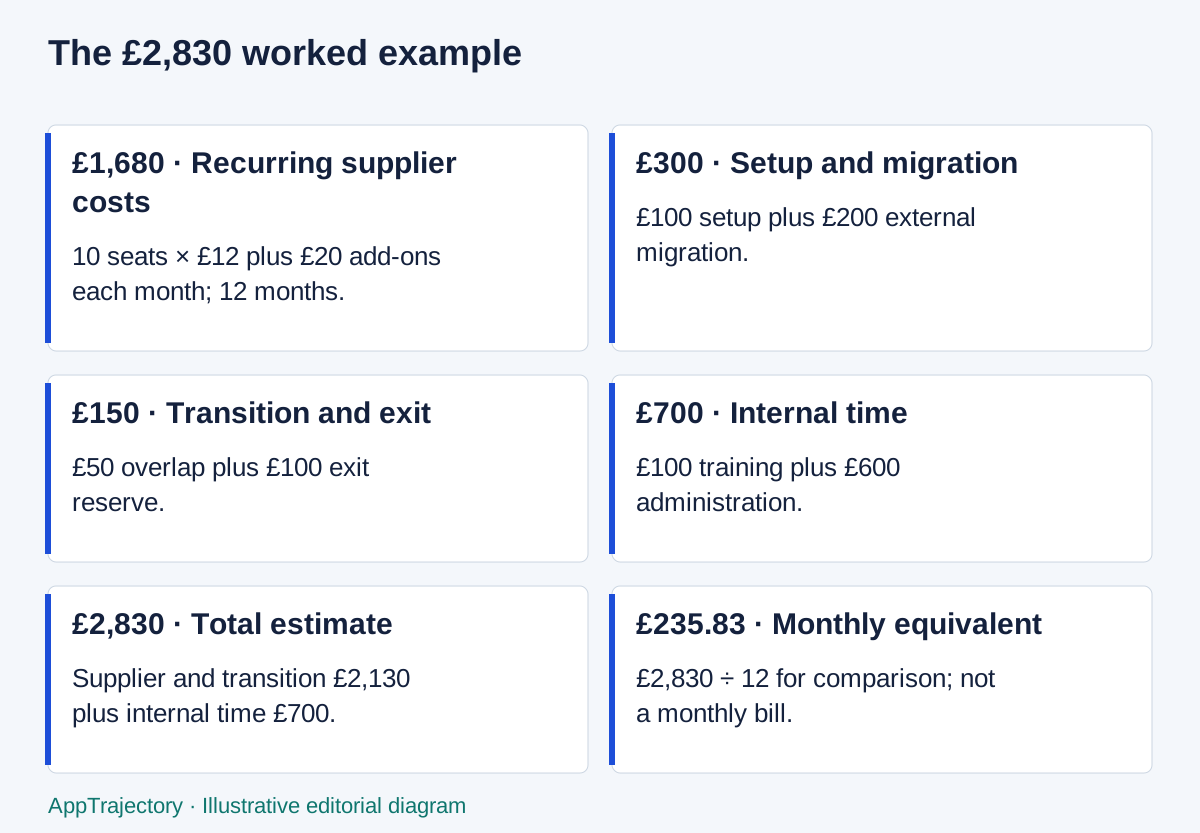
Read the diagram as text
- £1,680 · Recurring supplier costs: 10 seats × £12 plus £20 add-ons each month; 12 months.
- £300 · Setup and migration: £100 setup plus £200 external migration.
- £150 · Transition and exit: £50 overlap plus £100 exit reserve.
- £700 · Internal time: £100 training plus £600 administration.
- £2,830 · Total estimate: Supplier and transition £2,130 plus internal time £700.
- £235.83 · Monthly equivalent: £2,830 ÷ 12 for comparison; not a monthly bill.
Build a cost inventory
- Billed seats: compare active people with minimum billable seats and confirm whether guests or occasional users are paid.
- Required plan: check whether the access, export or integration capability forces a higher tier.
- Recurring supplier charges: base fee, add-ons, estimated usage and support.
- Implementation: setup and external migration, including data clean-up if separately quoted.
- Internal effort: training hours and ongoing administration, valued at an explicit hourly assumption.
- Transition: overlapping subscriptions while both systems are used.
- Exit: an allowance for export, clean-up, replacement work or contractual obligations.
Record a source and date for vendor amounts and mark estimates as estimates. A blank is not zero. If usage is unknown, leave it excluded and investigate its potential significance; entering zero would imply the team has deliberately assumed no usage cost. A free plan may still require training and administration.
A worked 12-month example
Illustrative estimate, using GBP as the unit label. These inputs are hypothetical and are not vendor prices. Assume constant seats and unchanged prices throughout the period.
| Component | Inputs and calculation | GBP |
|---|---|---|
| Recurring supplier cost | 10 billable seats × 12 per month + 20 monthly add-ons = 140; over 12 months | 1,680 |
| Setup and external migration | 100 setup + 200 migration | 300 |
| Overlap | 1 month × 50 old-tool monthly cost | 50 |
| Exit reserve | One-time allowance | 100 |
| Supplier and transition subtotal | 1,680 + 300 + 50 + 100 | 2,130 |
| Training time | 4 hours × 25 | 100 |
| Administration time | 12 months × 2 hours × 25 | 600 |
| Internal time subtotal | 100 + 600 | 700 |
| Total estimated cost | 2,130 + 700 | 2,830 |
| Monthly equivalent | 2,830 ÷ 12 | 235.83 |
All other supplier amounts are explicitly zero in this sample, and the minimum billable seats are no higher than the ten active seats. The monthly equivalent spreads the estimate for comparison; it does not describe invoice dates. An annual prepayment could require cash much earlier.
Use the SaaS cost calculator to load this example and compare it with a second scenario. The total should be reproducible from the inputs. If a new quote changes the plan or seat minimum, update those inputs and preserve the previous estimate for the decision record.
A supplier price is only the starting point
The ClickUp price page checked on 2 November 2026 displays Core at $9 per user/month billed yearly. This is a displayed offer; confirm the actual order, renewal terms and any older plan attached to your Workspace. The following example assumes five paid members on that annual-billing offer. Labour amounts are fictional planning assumptions.
| Component | Assumption | 12-month amount |
|---|---|---|
| Subscription | 5 members × $9 × 12 months, billed yearly | $540 |
| Training | 8 total staff-hours × an assumed $30/hour | $240 |
| Administration | 2 total staff-hours/month × 12 × an assumed $30/hour | $720 |
| Partial economic-cost estimate | $540 subscription + $960 internal time | $1,500 |
The $115 monthly equivalent is a comparison figure, not a monthly bill. Taxes, AI or other add-ons, extra chargeable roles, migration, overlap and exit are excluded and still need investigation; they are not assumed free. The internal hours and hourly rate are hypothetical. No currency conversion or discount is applied. Check the plan against your pilot before committing. View ClickUp.
For monday work management, first establish the billable seat bundle. monday’s billing guide describes a three-seat minimum and then bundles in multiples of five: a six-person team requires ten seats. Enter ten billable seats, not six, in the cost calculator for that scenario. Obtain the current work-management quote for the required plan, billing cycle, currency and guest mix before adding a price; CRM or dev pricing is a different product comparison. View monday work management.
Add the cost of operating an integration
An automation subscription is only one part of the handoff cost. Include scheduled checks, actions per accepted request, extra validation, notifications and recovery. Then add the person who maintains the mapping and reviews the exception queue. Keep estimated time separate from observed support work.
For an illustrative 100-request month, a three-action delivery path runs 300 actions before extra checks or failures. If the Make version also performs 176 standard one-credit searches, the narrow estimate is 476 credits. This is a workload assumption, not an invoice. A different schedule or additional validation changes the total.
Do not compare that number directly with 476 Zapier tasks. Vendor billing units and exclusions differ, and current public Zapier sources contain a trigger-accounting discrepancy. The Make vs Zapier comparison explains the assumptions and the Make intake guide shows the handoff being costed. Resolve the applicable account rate before claiming a saving.
Keep the same time horizon, currency and billing commitment for both options. Add required project-tool plans consistently. Put these amounts into the existing cost calculator without changing its defaults or scoring a product more favourably because a referral link is available.
Billing sources checked 14 September 2026: Make credits, Make operations, Zapier task-usage guidance and Zapier rates.
Put hosting responsibility into the automation total
A managed automation subscription and a self-hosted deployment do not contain the same responsibilities. Keep workflow design, credentials, source permissions and exception recovery in both options. For self-hosting, also include compute, database, storage, TLS, updates, backups, monitoring, security work and a tested restore.
Use the same one-year horizon, labour rate and workload. Separate a planning assumption such as “two platform-administration hours a month” from observed support time. A low server invoice is not a complete comparison if the person maintaining it is omitted.
The n8n Cloud versus self-hosted guide provides a responsibility ledger and labelled cost example. The n8n project-intake guide shows the workflow whose platform cost is being assessed. Use current vendor pricing and the team's actual infrastructure requirements; do not treat a self-hosted Community edition as equivalent to every paid Cloud or self-hosted feature.
Compare the same six-person team
Keep headcount and the 12-month horizon constant before comparing bills. This illustrative seat calculation uses six paid internal members and no external guests. It does not establish equivalent features or a cheaper suitable product.
| Input | ClickUp Core | monday work management |
|---|---|---|
| People doing the work | 6 | 6 |
| Billable seats in this example | 6 members | 10-seat bundle |
| Subscription calculation | 6 × $9 × 12 = $648 USD, billed yearly | 10 × the quoted monthly-equivalent seat price × 12 |
| Before comparing totals | Confirm this plan passes access and export requirements | Confirm the work-management plan, currency, billing cycle and any required credits |
A matched monday price is not established in this example; the calculation below shows the quote thresholds that would change the subscription comparison. Use the same training, administration, migration and exit categories for both options, then replace assumptions with evidence from the pilot. Do not compare the $648 subscription alone with a total that includes somebody else’s internal labour.
Test the assumptions that could change the choice
A team with ten active people could pay for more than ten seats if a contract imposes a higher minimum. Conversely, reducing active users to zero does not necessarily remove a base fee or an existing contractual commitment. Ask who counts as billable, when seats may be removed and whether a change affects the renewal price.
Run a sensitivity check with a higher administration estimate or a plausible seat increase. Compare the additional cost with the value of the outcome being pursued. Do not claim savings from the difference between two estimates; savings require an appropriate baseline and evidence of what was actually spent or avoided.
The simple model assumes a constant seat count and monthly-equivalent price. It does not automatically apply volume tiers, currency changes, price increases, discount expiry or staged deployment. If those features materially affect the decision, model periods separately in a spreadsheet and explain the method.
Use renewal as a fresh decision
- Confirm the renewal date, notice period, billing cadence and current quote from the agreement.
- Reconcile active users, paid guests and unused capacity.
- Check whether essential features still require the selected plan.
- Review usage and add-ons against invoices, not memory.
- Ask the administrator about recurring effort and unresolved support work.
- Test the export route again before making continued reliance unavoidable.
- Compare the cost and disruption of staying, changing the workflow or migrating.
A renewal review should not become a search for a cheaper product at any cost. Switching can add migration, training and overlap while interrupting useful work. Include those costs and the uncertainty around them. Retaining a functioning tool can be the right choice even when its subscription is higher.
Make the cost decision reviewable
Record the horizon, currency, source of each material input, excluded categories and owner of the estimate. Separate a vendor quote, an internal estimate and an observed invoice. If two scenarios exclude different categories, explain that they are not yet fully comparable.
A small spreadsheet can be enough for a stable, simple arrangement. Use the calculator when its assumptions fit and move to a more detailed model when they do not. Before a change, use the software migration checklist to account for data, people and rollback work that a subscription comparison misses.
Put a number on the plan and seat tradeoff
For six internal members, the displayed annual-billing offers checked on 2 November 2026 give Core at $648 USD and Business at $1,224. Business adds $576 annually, or $8 per active member per month in this example. These figures exclude tax, guests, extras and labour. Do not infer a monthly-billing quote or a renewal rate from a crossed-out regular price.
For monday, the documented ten-seat bundle for six members means 60% seat utilisation. Dividing the bundle bill by six active people gives a per-person cost 1.667 times the advertised per-seat rate. At that headcount, a quoted annual-billing rate above $5.40 USD per seat per month exceeds the $648 Core subscription; above $10.20 exceeds the $1,224 Business subscription. Those are break-even thresholds, not monday prices or evidence of equivalent features.
I would choose the suitable plan before chasing the lowest number. If recurring view exports are essential, the cheaper ClickUp allowance may be the wrong basis for comparison. If monday’s intake process replaces enough real administrative work, a larger subscription may still be justified; that needs an operating record rather than an invented time-saving claim.
For a new-plan purchase, ClickUp’s export limits list Core List-view exports as trial access, with no Table or Form view exports. Business includes unlimited List-view exports; the view-specific table also lists unlimited List/Table exports on Business. Existing Free/Unlimited descriptions still differ across help pages. Verify the exact plan, view and role instead of carrying an old allowance into a Core purchase. Workspace task-data export is separate from view export. Checked 2 November 2026.
Include switching cost and test the deciding assumption
A switch may require data clean-up, training, a period of parallel operation, replacement integrations and recreating records that do not export. Estimate those categories separately from recurring fees; name excluded or unknown amounts rather than silently enter zero.
Change the assumptions most likely to reverse the conclusion: billable users, usage volume, operator hours and required plan. If the preferred option changes under a plausible scenario, keep that sensitivity in the recommendation. A lower subtotal with essential costs excluded is not a defensible cheapest option.