 Stuart Kerr Spindlow
Start with a handoff you can explain
For a small project team, I would automate a repeated reminder or a clearly approved handoff before attempting a two-way sync. Start where the source record is trustworthy, the next action is explicit and somebody can resolve an exception. If those conditions are missing, buying another automation tool will leave the difficult part unfinished.
Useful workflow automation examples include moving an approved request into delivery, alerting a reviewer, reminding an owner about overdue work, surfacing a blocked dependency, preparing a status digest and opening a completion checklist. Each removes a different piece of repetitive coordination. They need different controls.
The examples below use a fictional Onboarding Refresh project. They are design specifications you can adapt to your software, rather than preconfigured recipes. The aim is to choose the first workflow worth piloting; our linked Make and n8n guides cover a particular implementation.
Six examples and when to use them
| Workflow | Useful when | Required record | Hold the action when |
|---|---|---|---|
| Approved request to delivery task | Accepted work is repeatedly copied between systems | Approved version and destination task receipt | Approval changed or creation outcome is uncertain |
| Ready-for-review reminder | Work waits for a named reviewer | Current status, reviewer and reminder checkpoint | Work left review or no reviewer is assigned |
| Overdue-work follow-up | Agreed follow-ups are easily missed | Committed due date, owner and escalation rule | Date is only a request or work is already complete |
| Blocked-dependency alert | Another team needs to act before work can continue | Blocking item, affected task and responsible owner | The dependency is stale or no next action is agreed |
| Project status digest | People repeat the same status lookup | Authoritative task references and reporting cutoff | Source is incomplete or audience lacks access |
| Completion checklist | Finishing work requires a repeatable review | Delivery version and acceptance owner | Acceptance, retention or access review is unresolved |
My usual first choice is the review reminder because it can improve visibility without creating another delivery record. Choose intake instead when copying accepted work is the clearer problem and the team can reconcile duplicate or uncertain task creation. A frequent task is a candidate, not automatically a worthwhile automation.
1. Turn an approved request into a delivery task
Suppose a coordinator accepts DEMO-021, version 3, in an intake register. The automation creates a task in the agreed delivery list and returns its identifier to that same request. Submission alone does not authorise work; acceptance of the current version does.
- Trigger and inputs: a request becomes eligible after human approval. Require a stable request ID, approved version, outcome and destination. Revisit requests approved after initial submission.
- Action and owner: create one delivery task under an agreed triage owner, then retain the task ID and URL with the request. Keep the requested date separate from an accepted deadline.
- Failure boundary: a timeout may follow successful creation. Check the destination for the request reference before trying creation again. A source status flag alone is not a cross-system transaction.
- Pilot check and stop rule: repeat the input and interrupt the receipt step. Pause if the operator cannot establish whether the task exists or which version was approved.
This is the strongest example when the intake register has a real review role. If requests can arrive directly in the delivery tool, removing the intermediate copy may be simpler. See the Make and ClickUp intake walkthrough or the n8n intake walkthrough for one concrete field contract and recovery approach.
2. Remind a reviewer only while the work still needs review
DEMO-022 moves to Ready for review with a named reviewer and a review-by time. The workflow sends one initial notice and, if needed, a later reminder. The delayed step must read the current record again: the author may already have withdrawn or revised the work.
- Trigger and inputs: entry into the agreed review state. Retain the item ID, version, reviewer, current status and review checkpoint.
- Action and owner: notify the assigned reviewer with a link to the work and the specific decision needed. The delivery lead owns missing-reviewer exceptions.
- Failure boundary: a timer remembers an earlier event, not the latest truth. Suppress a reminder if the item is accepted, withdrawn, superseded or assigned elsewhere. Reconcile uncertain sends before replaying them.
- Pilot check and stop rule: move the item out of review before the reminder falls due. It should send nothing. Stop repeated notices if status or ownership cannot be read reliably.
Use the existing task tool when its available triggers, conditions and actions express this complete rule. ClickUp’s automation limits distinguish active rules from monthly actions and place conditions on Business or above. Do not assume a simple-looking reminder is available on every plan.

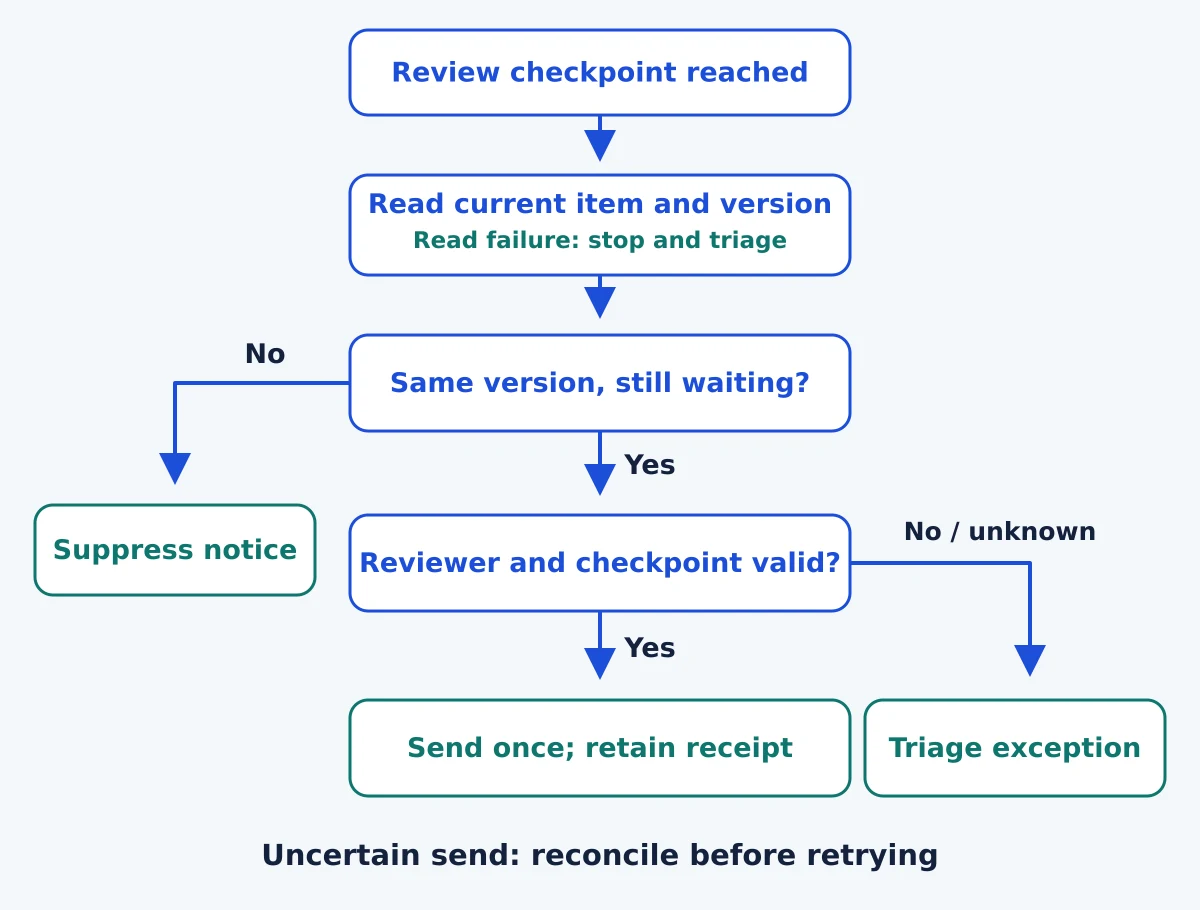
Read the diagram as text
- Read the current record: At the checkpoint, check the latest item and version. An unreadable record goes to triage.
- Suppress stale notices: Send nothing if the version changed or work left the waiting-for-review state.
- Validate the recipient and checkpoint: Confirm the current reviewer and that this reminder has not already been sent; otherwise reconcile or triage.
- Send and retain the receipt: Send one reminder only when the checks pass. Reconcile an uncertain send before trying again.
3. Surface overdue work without inventing a new deadline
An owner has committed to provide the access decision for DEMO-023 by Thursday. A scheduled check finds the item still open after that commitment and sends the agreed follow-up. It should not turn every requester’s preferred date into an overdue delivery promise.
- Trigger and inputs: a scheduled review of open work with a committed due date, explicit timezone and responsible owner. Exclude cancelled and completed items.
- Action and owner: send a concise notice to the owner, then escalate only under a separately agreed rule. The project coordinator maintains the rule and working-day assumptions.
- Failure boundary: a due date may change after the check. Re-read it before a delayed escalation. Keep a per-item checkpoint so every hourly run does not repeat the same notice.
- Pilot check and stop rule: test a changed deadline, a completed item and an absent owner. Hold escalation when the commitment or recipient is ambiguous.
A daily queue can be more useful than dozens of individual messages. Choose the least frequent check that still meets the team’s response requirement, and give people a clear way to correct an inaccurate record.
4. Alert the owner of a blocked handoff
The onboarding page cannot move forward until DEMO-024’s access request is resolved. The automation surfaces that dependency to its owner and links both records. It should make the next decision visible, rather than automatically moving dates or declaring that the blocker is solved.
- Trigger and inputs: an agreed blocked state or a verified dependency change. Require both task references, the blocker’s owner and the requested next action.
- Action and owner: notify the responsible owner or place the item in a shared exception queue. A delivery lead resolves conflicting ownership.
- Failure boundary: two tools can disagree about the dependency. Choose one authoritative record, then check its current state before notifying. Avoid circular rules that repeatedly update each other.
- Pilot check and stop rule: clear the blocker and change its owner in separate sample cases. Pause if the rule cannot identify the authoritative state or starts an update loop.
Treat automatic rescheduling as a different, higher-impact workflow. A dependency alert does not establish that a new delivery date is feasible. The backlog prioritisation guide explains how dependencies affect the human ordering decision.
5. Prepare a status digest from authoritative records
Each Friday, the coordinator needs accepted work, current blockers and the next decisions for Onboarding Refresh. A scheduled digest can collect those references and prepare a short report. Keep the reporting cutoff visible so readers know which changes it includes.
- Trigger and inputs: a scheduled reporting window and a defined project scope. Require stable task references, current owners and a successful source read.
- Action and owner: group the findings into completed work, blockers and decisions needed. Link back to each source. The coordinator owns audience and interpretation.
- Failure boundary: an empty response can mean no changes or a failed/partial read. Mark the report incomplete for review when the source cannot be reconciled; do not quietly publish a reassuring empty digest.
- Pilot check and stop rule: include a completed item, an unchanged blocker and an inaccessible source. Hold sending if coverage or recipient access is uncertain.
Start with deterministic fields. If you later use AI to summarise comments, keep that as a draft until a person checks names, commitments and sensitive information. A summary must not convert a suggestion into approval. The async communication guide helps define the decision record the digest should preserve.
6. Open a completion checklist without silently closing the project
When DEMO-025 reaches Delivered, prepare a checklist for acceptance, documentation and outstanding access. The automation can make the review visible. The acceptance owner still decides whether the work meets the agreed outcome.
- Trigger and inputs: delivery of an identified version, with the acceptance owner and checklist template recorded.
- Action and owner: create or reveal one completion checklist linked to that version. Preserve the evidence needed to accept the result.
- Failure boundary: Delivered is not necessarily Accepted. Keep deletion, access revocation, irreversible archive actions and customer promises outside this first workflow.
- Pilot check and stop rule: reopen the sample work and deliver a revised version. Check whether the existing checklist should be updated or a new reviewed record is needed. Hold closure while acceptance or retention is unresolved.
This is useful when teams repeatedly miss the same completion step. If the checklist itself keeps changing, stabilise it manually first. Automating a disputed definition of done only distributes the dispute faster.
Choose the platform after choosing the example
Write the required event, condition, action and exception route before browsing connectors. If all the work stays inside your existing project platform, test its native automation first. For cross-app work, verify exact fields, permissions and actions; a supported app name does not guarantee the complete handoff.
monday’s action allowances separate automations from integrations. Make’s credits guidance counts work differently from execution-based tools. Include rechecks, reminders and recovery in the estimate, rather than equating one project item with one billable unit.
Access is part of the workflow design. For example, n8n’s sharing documentation explains that editors can use credentials already used by a shared workflow, while editing nodes with unshared credentials is restricted. Agree what the backup can run and change before relying on that handover.
Use the workflow automation tools shortlist when you have a clear requirement and need to choose a platform. It covers native ClickUp/monday options and Make, Zapier and n8n Cloud. No extra service is required merely to follow these examples.
A worksheet for the first pilot
The project automation worksheet (CSV) contains the six fictional examples with inputs, owner, receipt, exception and pilot checks. Open it in your spreadsheet tool, replace the sample references and select one workflow. It is a planning worksheet, not an executable integration.
For a worked reminder, suppose DEMO-022 version 2 enters review on Monday. The reviewer accepts it before Tuesday’s reminder checkpoint. A valid result is no reminder, because the latest state is Accepted. In a second sample, leave it waiting and confirm that one notice reaches the agreed reviewer. Then rerun the checkpoint and check that it does not send a duplicate.
Record the actual tester, date, product plan and outcome. Include setup time and time spent resolving exceptions. For an illustrative ten weekly handoffs, four minutes of copying per handoff means forty minutes of manual work. If automation needs thirty minutes of weekly care, the narrow recurring difference is ten minutes before setup and incident costs. Those assumptions are a calculation to replace with observations, not a promised saving.
Test the ordinary case, a repeated event, a changed record, lost access and an uncertain result. Ask a backup operator to explain the last completed action. In Make, sequential processing can order one scenario’s runs; it does not exclude another writer or create a transaction across services.
The software pilot plan provides a fuller acceptance record. Stop the pilot if essential access, ownership, receipt or recovery checks fail. Keeping the current manual process is a valid outcome.
My recommendation for a first automation
Start with one reversible, visible workflow. I would choose a reminder that checks the latest review state when missed coordination is the problem. Choose approved-request intake when repeated copying is the problem and a named operator can reconcile creation and receipts. Keep a manual process when volume is low or the approval rules are still changing.
Expand only after the normal case and failure cases produce an understandable record. The next useful improvement may be a better source field or clearer ownership, rather than another connector.