 Stuart Kerr Spindlow

The buying question is whether the team can maintain one understandable delivery record. A board can look tidy while decisions remain scattered across messages. Start with the outcome, owner and acceptance evidence, then decide whether Projects is the right place to organise them. This assessment concerns the current Projects product on GitHub.com, rather than Projects classic or a self-hosted server edition.
My assessment against five buying criteria
| Criterion | Where it fits | Decisive limitation |
|---|---|---|
| Connection to delivery | Work already represented by issues and pull requests | A board does not replace acceptance of the underlying work |
| Planning clarity | A shared backlog with agreed field meanings | Flexible fields still need a named maintainer |
| Stakeholder access | Participants whose repository access matches their responsibilities | Project and repository permission boundaries differ |
| Operating cost | An existing GitHub workflow with bounded administration | Free subscription does not mean zero internal cost |
| Exit readiness | A planned inventory and reconciled view export | A TSV view is not a complete recoverable project backup |
These are qualitative editorial judgments, not measured speed scores or customer averages. I would keep Projects on the shortlist when its connection to delivery removes duplicate work. I would reject the configuration if an essential stakeholder cannot see the records they need, or if maintaining an additional client-facing register becomes the real workflow.
What Projects contributes to a delivery workflow
GitHub documents table, board and roadmap layouts, fields and views around issues and pull requests. Changes to linked issue information can be reflected in the project and vice versa. The practical advantage is a closer connection between planned work and the record people actually update.
For a fictional six-person delivery team, use a request reference, accountable owner, agreed acceptance condition and target date. Keep Needs detail separate from Ready: a request should not become a delivery commitment merely because somebody placed it on a board. Link the implementation record to the decision that accepted the work.
A useful weekly review asks three questions: which accepted work lacks an owner, which dependency changes the next action, and which completed item still lacks acceptance evidence? A table or board is useful only if it helps someone answer those questions without reconstructing the history from private messages.
Our user-story and acceptance-criteria guide helps define the work. Use backlog prioritisation to agree its order. Keep optional labels and decorative categories out until they support a real decision; every new field creates a small maintenance obligation.
Project access is not repository access
GitHub provides Read, Write and Admin project roles. Its access documentation also explains that viewing an item requires the relevant repository permission. Granting access to the project alone does not reveal private repository items to somebody who lacks access to their source repository.
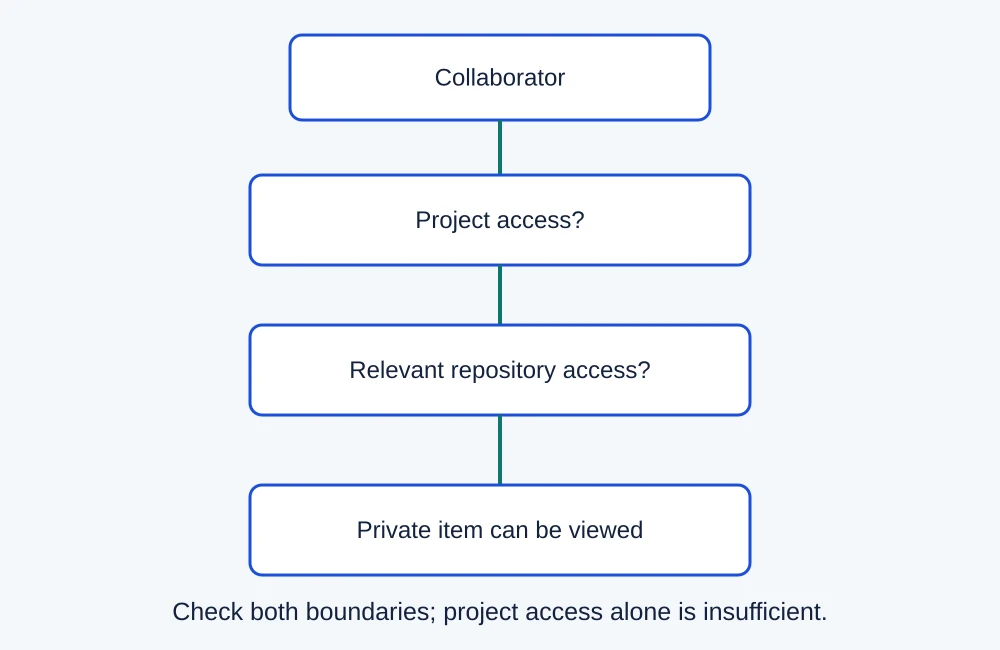
For a client project, make a role matrix before choosing the configuration. Record what the coordinator, developer and client reviewer must see, change and export. A filtered view is a convenience for finding work, not a substitute for an access boundary. Test an unauthorised direct link as well as ordinary navigation.
Use fictional records in an authorised pilot. Ask a stakeholder to find the acceptance condition and the latest decision without help from the project administrator. If the record is hidden because it lives in a restricted repository, decide whether the repository arrangement should change or whether another system is the better place for that collaboration.
Do not broaden a repository permission just to make a board demonstration succeed. The team’s access owner should approve the intended boundary. A configuration that requires excessive access to support routine client review fails the buying requirement, even if developers find it convenient.
Free versus a paid GitHub plan
GitHub’s pricing page checked on 9 November 2026 lists Issues and Projects within Free. It also displays Team at $4 USD per user/month. That is a platform-plan headline, not a separate mandatory Projects charge. A team should establish which required platform controls justify payment before treating Team as its project-management budget.
| Scenario | Input | Subscription estimate |
|---|---|---|
| Eligible Free configuration | $0 listed plan price | $0 subscription |
| Team at the displayed headline | 6 users × $4 per month | $24 per month; $288 across 12 unchanged months |
The annual figure is multiplication over a constant twelve-month scenario, not a claim about payment timing, tax, renewal protection or a supplier quote. Check the actual billing terms and billable population before committing. Additional services and usage can have separate charges; do not treat every GitHub capability as included without limits.
Now add internal effort. In a fictional budget, two hours of administration per month at an assumed $40 hourly value add $80 of economic cost. Combined with the $24 subscription input, that is $104 per month or $1,248 over twelve unchanged months. Internal time may not create another payroll payment, but it still consumes capacity. These are assumptions for a decision, not measured operating results.
Use the SaaS cost calculator to compare the same horizon with the current process. If the team already pays for a suitable GitHub plan, assess incremental costs rather than counting the entire platform bill again. Conversely, include training or a second stakeholder-facing system if Projects cannot replace it.
Automate only after the ownership rule is clear
Projects supports built-in workflows, with API and GitHub Actions routes for more control. The existence of an automation route does not establish that the team can operate a particular integration safely. Keep credentials, usage costs and recovery responsibilities in the evaluation.
Begin with a reversible housekeeping task. Define the event that qualifies work, which record identifies it and what happens when the outcome is uncertain. A repeated event should not silently create a second commitment. Stop ambiguous writes for reconciliation instead of assuming that an absent response means nothing happened.
If the automation crosses another application, compare the source record and destination record independently. Give one person responsibility for checking failures and covering absence. Our workflow automation examples can help select a bounded first job; a longer integration is not automatically a better implementation.
Export a view, then prove what the next system needs
GitHub documents exporting a project view as a tab-separated file. Treat that as a specific view-export route. It does not establish a complete archive of discussions, attachments, repository history or every relationship required to reconstruct the working system.
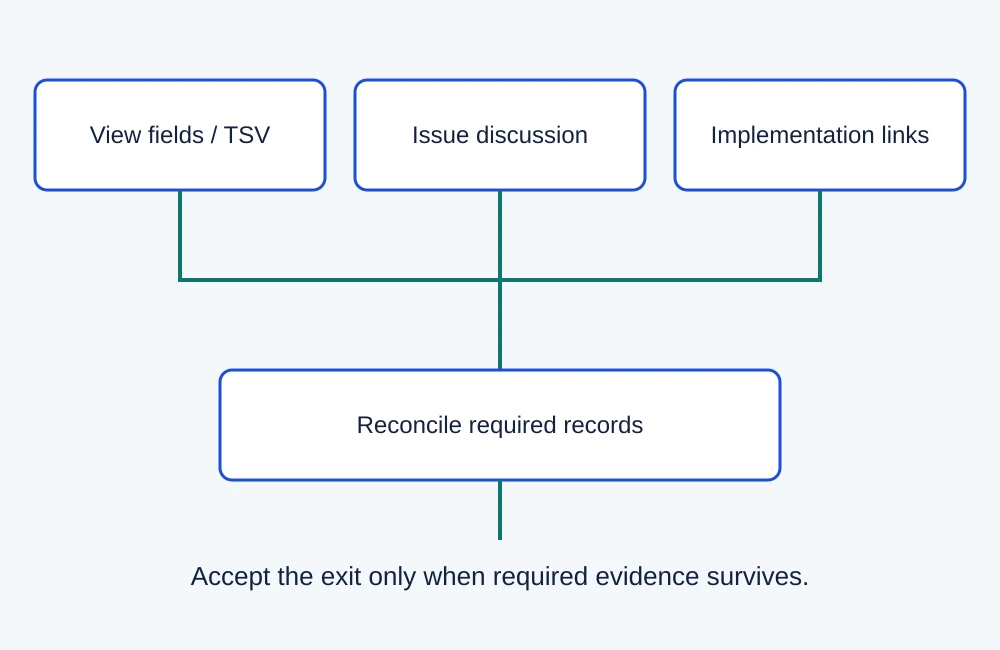
Create a small representative record containing an owner, status, accepted version, linked issue and implementation reference. Export the view you actually plan to use. Compare the file with a written list of required fields, identifiers and relationships. Do not mark a field preserved merely because another column has a similar name.
Then ask another authorised person to reconstruct the decision without relying on your explanation. Record which information still requires GitHub access and how it will be retained if the team leaves. Use the software migration checklist to agree reconciliation, rollback and access-removal conditions before changing the source of truth.
When I would choose another approach
- Consider the ClickUp review when a broader task hierarchy and backlog workflow matter more than proximity to code. Verify the required export and access plan.
- Consider monday work management when structured incoming requests and a coordinator-led triage board define the buying job.
- Consider the Trello review when a compact shared board is enough and repository-linked implementation is secondary.
- Keep an existing maintained register when it already preserves ownership and acceptance with less administration.
These are different starting situations rather than a universal ranking. More views or a paid subscription do not repair unclear decision ownership. Use the software evaluation scorecard only after essential access, exit and budget requirements pass.
A pilot that can change the purchase decision
- Agree the intended GitHub plan, repository arrangement, roles and essential acceptance checks.
- Use a valid request, an incomplete request and a material amendment. Check who accepts each change and owns the next step.
- Ask the least technical participant to locate and explain the current record with the access they will actually receive.
- Exercise an ordinary update and an uncertain automation outcome. Record the observed behaviour and recovery owner.
- Export the representative view and reconcile required records before approving a wider rollout.
Record tester, date, configuration and result in the software pilot plan. These are proposed checks; this review does not imply a new account test, permission audit or performance benchmark. An inconclusive pilot is a reason to investigate the deciding requirement, not to invent a passing score.
Final verdict
I would choose GitHub Projects first for a repository-led team whose essential stakeholders can work within the intended access model. Its strongest reason to be selected is a planning record connected to delivery. Start with one bounded project and explicit ownership.
Choose another approach when nontechnical intake, client boundaries or exit requirements would force a parallel system that the team cannot maintain. Confirm those constraints before buying a higher plan or migrating the backlog.
Sources and image sources
GitHub identity: official brand resources.