 Stuart Kerr Spindlow

This review focuses on team delivery and the buying decision. A visually tidy board is useful only when people can identify the next action, the responsible owner and the evidence that work was accepted. Start with those requirements before choosing a subscription or adding Power-Ups.
My assessment: where Trello fits
| Criterion | Editorial assessment | Important limitation |
|---|---|---|
| Work visibility | A strong starting point for a bounded, board-led workflow | A list position needs an agreed meaning and an accountable owner |
| Access boundaries | Board visibility provides an explicit configuration choice | Check the actual role; a filtered view is not confidentiality |
| Automation capacity | Useful for repeatable housekeeping and handoffs | Runs and operations are different pooled limits |
| Team cost | Straightforward headline seat prices | Multi-board guests, add-ons and internal work change the total |
| Portability | Export options support a planned exit | An exported file is not an automatically restorable board |
These are qualitative judgments against a small team’s buying job. I would keep Trello on the shortlist when a single delivery board explains most of the work. I would investigate alternatives when the team needs complex cross-project reporting, tightly separated client contexts or a dependency model that would otherwise be maintained in parallel documents.
The useful test is whether a colleague can reconstruct the decision record, not whether the board contains many cards. A card should answer what outcome is wanted, who owns the next step, which version was accepted and what still blocks completion. If that information stays in private messages, moving the task into another list will not repair the handoff.
Define a small workflow before adding features
For a fictional Onboarding Refresh project, I would start with Needs detail, Ready, In progress, Review and Done. Ready means the team has accepted enough information to act. Done means the agreed acceptance condition has been met. Keep a requested date separate from a delivery commitment.
Use DEMO-051 for a request that needs clarification, DEMO-052 for an accepted task and DEMO-053 for work awaiting review. Give each a permanent reference and a named role. Define what should happen when the description changes after approval. This example is a design to adapt, rather than a claim that an automation has already been tested.
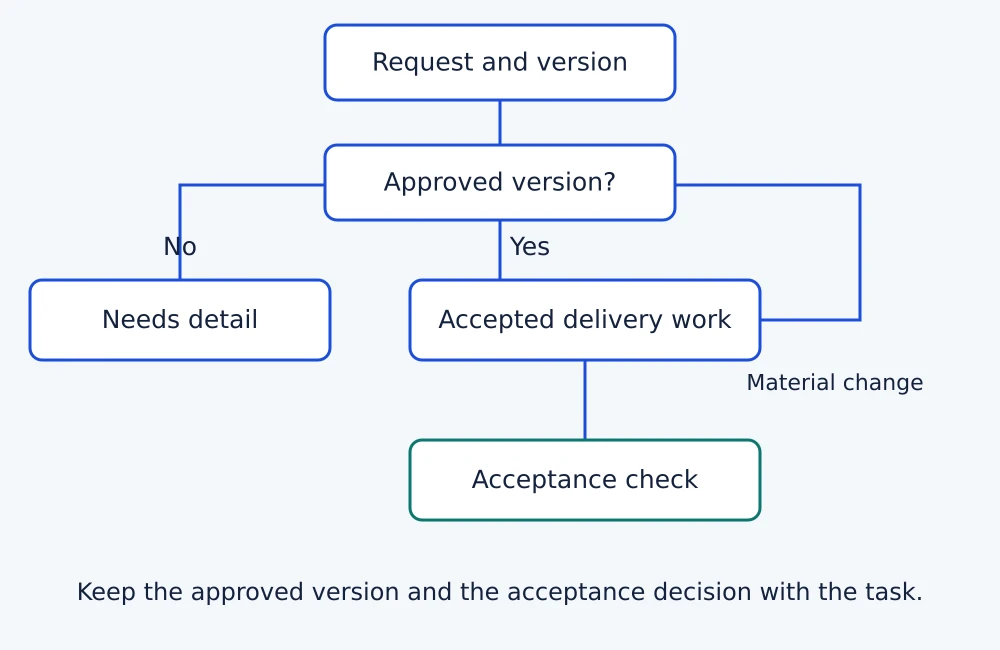
Use the user-story and acceptance-criteria guide to define a useful task, and the prioritisation method to decide its order. Do not use labels, due dates or a card’s location as substitutes for an explicit agreement. Introduce another field only when somebody will maintain it and it changes a real decision.
Free, Standard or Premium?
The published USD plan prices checked on 2 November 2026 provide these subscription inputs. Annual billing is a commitment, not the same payment arrangement as paying monthly. Tax, external subscriptions and your team’s operating effort are excluded.
| Plan | Published subscription input | Six-person annual subscription |
|---|---|---|
| Free | $0; within its collaborator and board limits | $0 while eligible |
| Standard | $5 per user/month billed annually; $6 billed monthly | $360 with annual billing |
| Premium | $10 per user/month billed annually; $12.50 billed monthly | $720 with annual billing |
Free lists up to ten collaborators and ten boards per Workspace. Standard adds capabilities such as Custom Fields and advanced checklists. Premium adds more views, observers and simple data export. Choose the lowest tier that passes your essential requirements, rather than treating every feature in a higher plan as a reason to upgrade.
For the same six people, monthly billing over twelve unchanged months calculates to $432 on Standard or $900 on Premium. The annual-billing differences are $72 and $180 respectively. These are subscription calculations, not savings I have measured or a prediction that your headcount and price will stay fixed.
Budget Power-Ups separately when they require another subscription. Keep migration, training and administration in the SaaS cost calculator. A product with a $0 subscription can still be costly to operate if the team spends time reconstructing missing decisions or coordinating multiple boards.
Guest access can affect both cost and boundaries
On Standard and Premium, a guest invited to more than one board in the same Workspace becomes a billable multi-board guest at the normal member rate. That is the relevant limit in the guest-billing guidance; “external collaborator” does not automatically mean a free seat.
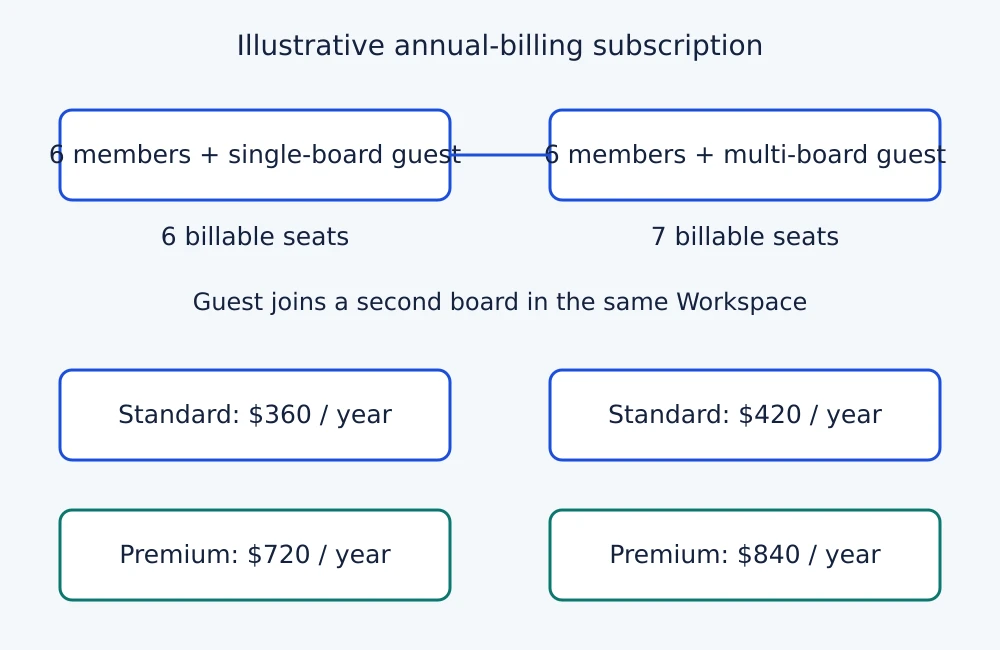
Before inviting clients, write down which boards each person needs, whether access is temporary and who may approve a change that affects billing. In a six-member example, one billable guest raises annual Standard subscription arithmetic from $360 to $420, or Premium from $720 to $840, before tax and extras. Enterprise has different guest treatment; do not apply this example to it.
Then check access separately. Trello’s visibility guidance distinguishes private, Workspace-visible and public boards. Private boards are visible to their members and paid-Workspace administrators. A public link is accessible to people outside the team. Review the actual configuration and prohibited access with fictional records before storing confidential work. A lower guest bill is not evidence that the permission boundary is suitable.
Count automation runs and operations separately
The automation quota documentation distinguishes a run from the actions within it. Quotas are pooled across a Workspace, so one busy board can affect the remaining allowance for others. Premium’s unlimited run allowance does not remove operation limits.
Free includes 250 monthly runs and 2,500 operations; Standard includes 1,000 runs and 20,000 operations. Premium has a separate operation allowance with a per-user increment and a cap. Check the current account allowance before relying on frequent or multi-action rules.
For a fictional workload, 120 approved requests that each trigger one automation with three ordinary operations suggest 120 runs and 360 operations. Add reminders, repeated triggers and other boards separately. This is an illustrative workload model, not an executed account result. It also does not prove that a particular complex rule uses only three operations.
I would first automate a reversible reminder or an explicit handoff. Define what happens when the owner changes, a card re-enters a list or an action result is uncertain. Stop and reconcile ambiguous sends or writes before replaying them. Our workflow automation examples help select a bounded first task. Cross-app intake may justify a service such as Make, but adding another operator dependency should solve a clear problem.
A usable exit requires more than downloading a CSV
Trello’s export documentation supports board JSON for board members, while Premium adds CSV and Workspace exports. CSV omits comments. Board JSON includes only the most recent 1,000 actions; an all-board Workspace export is a separate route for fuller comment retention. Exported JSON or CSV cannot simply be imported to recreate the board.
A Workspace administrator can include raw attachments in a Workspace export; without that option, exports link to the hosted files. Inbox cards need to move to a board before export. These differences matter when the exit requirement includes the discussion and original files, rather than a list of card titles.
Use a fictional card containing an accepted version, two comments, a checklist and an attachment. Export through the route you plan to retain, then check what another authorised person can reconstruct without relying on the original board. Record lost relationships or history and decide whether the limitation is acceptable. Keep an independent retention route when the required record is absent.
The software migration checklist provides the wider transition controls. Do not delete or revoke the old source until the replacement record and access have been reconciled. A successful download proves that a file arrived; it does not prove recoverability or completeness.
When I would compare another tool
- The ClickUp assessment is worth reading when backlog structure, task relationships and more explicit controls are central. Check the current plan and export requirements before assuming it is a cheaper replacement.
- The monday work-management assessment suits a different buying question: structured request intake into a shared triage board. Check the actual seat bundle and guest arrangement.
- Use the project-management shortlist when you still need to compare approaches. Keep a maintained existing register if it already preserves the outcome, owner and decision trail with less overhead.
Neither a broader feature list nor an affiliate relationship changes these conditions. I would not migrate a working team solely to obtain another view or follow a product trend. Identify the specific failure in the current process and require the alternative to fix it without losing essential records.
The pilot that should decide the purchase
- Agree the intended plan, participants, board visibility and essential fields before loading sample records.
- Use a valid request, incomplete request and material amendment. Check who accepts the work and who can explain its current state.
- Exercise an ordinary automation, a repeated trigger and a failed or uncertain action. Inspect the resulting run and operation use.
- Check the cost and access effect of the intended guest arrangement using the documented rules and an authorised evaluation setup.
- Export a representative card and its supporting records. Reconcile what survives before treating the exit requirement as passed.
Record the actual tester, date, plan and observed result in the software pilot plan. These are proposed acceptance checks. They do not imply that a fresh speed, reliability or permission benchmark was run for this article.
My recommendation
Trello is a sound candidate when a small team can keep its accepted work understandable on a board and its required access, automation and exit controls fit the selected plan. I would start with one bounded project, explicit ownership and a short set of acceptance checks.
Move to Standard or Premium for an identified requirement that the cheaper tier cannot satisfy. Choose another tool when the work would still need a parallel dependency model or an unacceptable export workaround. A disciplined pilot should determine that decision before the whole team moves.