 Stuart Kerr Spindlow

This is a buying decision for a small project team, not a count of every feature in either product. The common job is to accept a request, assign ownership, explain its current state and retain the acceptance record. If the current process already does that reliably, keeping it belongs on the shortlist.
Compare the constraint that changes your choice
| Criterion | ClickUp starting situation | Trello starting situation |
|---|---|---|
| Work structure | A maintained backlog and more task-level detail are essential | A board can explain the accepted work without another hierarchy |
| Operating ownership | A named administrator will keep the configuration understandable | The team can agree a short board routine and maintain it |
| Cost fit | The required plan justifies its seat and operating costs | The board, guests and export needs fit the selected plan |
| Evidence of completion | Task detail must preserve the accepted version and decision | A card must preserve the accepted version and decision |
I use the same criteria for both products. These are qualitative fit judgments, not benchmark scores or a claim that one interface is universally easier. An essential access or exit requirement can rule out a configuration regardless of its subscription price.
Choose Trello for a bounded shared queue
Trello is my starting recommendation when the team can describe the work through a small set of meaningful states. In an illustrative Onboarding Refresh project, Needs detail, Ready, In progress, Review and Done can be enough. A list should represent an agreed state rather than a personal interpretation.
Its attraction is the opportunity to keep the coordination model small. Its limitation is that a tidy board can conceal missing ownership or a separate spreadsheet doing the real reporting. Before adding another field or board, identify the decision it will support and the person who will keep it current.
Trello Standard lists Custom Fields and advanced checklists; Premium adds more views and administration features. Do not buy the higher tier merely because its feature list is longer. Start with the requirement that the cheaper configuration cannot meet. Read the full Trello review for guest billing, automation and export considerations.
Choose ClickUp when structure removes real ambiguity
ClickUp becomes the stronger starting point when a shared board leaves the team maintaining important task detail elsewhere. Its current pricing page lists task and subtask support, with additional controls in paid plans. The buying case is whether the intended configuration replaces duplicate work, rather than whether it can hold more fields.
I would give the configuration an owner before migrating the backlog. Agree what belongs in a task, which statuses indicate acceptance and who may change a shared convention. More structure helps when it preserves a necessary distinction; it adds overhead when people cannot explain why the distinction exists.
Use one representative project before introducing more containers or dashboards. Ask a colleague to find the accepted scope, accountable owner and next decision without assistance from the administrator. Read the full ClickUp review before assuming that a particular export, access role or automation is available on the intended plan.
Six-person subscription arithmetic
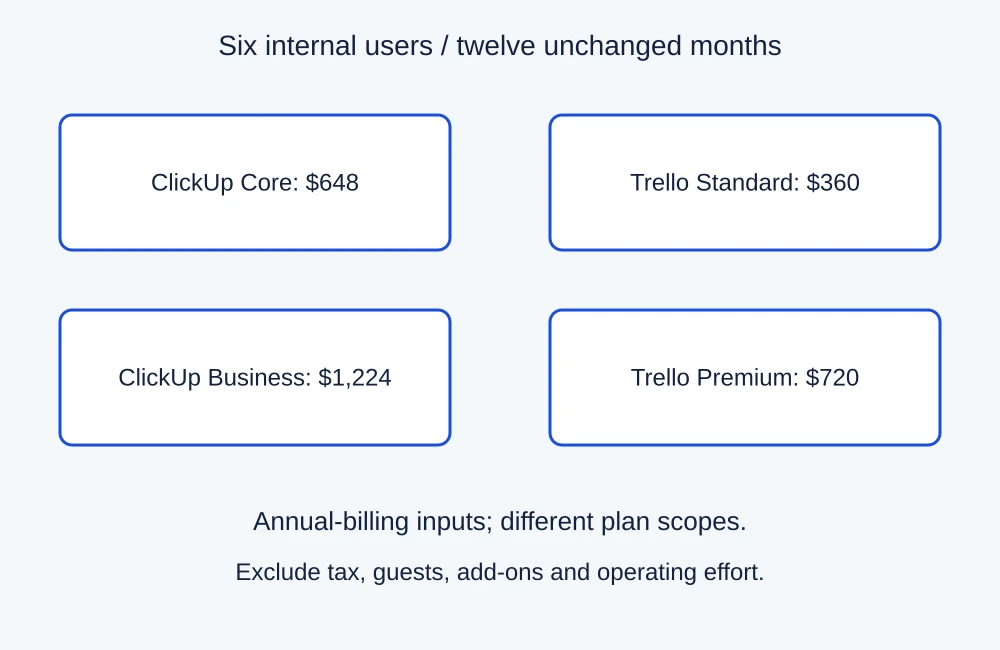
The official USD pricing pages checked on 23 November 2026 provide these annual-billing inputs. ClickUp displays Core and Business prices alongside higher crossed-out regular prices. Those crossed-out figures are not evidence of monthly billing rates or guaranteed renewal terms.
| Plan | Per user/month, billed annually | Six users across twelve months |
|---|---|---|
| ClickUp Core | $9 | $648 |
| ClickUp Business | $17 | $1,224 |
| Trello Standard | $5 | $360 |
| Trello Premium | $10 | $720 |
The same team therefore pays an illustrative $288 more for Core than Standard, or $504 more for Business than Premium over a constant year. These pairs are arithmetic comparisons, not equivalent feature bundles. Select the least expensive configuration that passes the actual requirements, then compare the complete operating cost.
Both products list free options, but a free subscription does not establish that the required configuration passes. Trello Free lists up to ten collaborators and ten boards per Workspace. Paid Trello guest billing can change when an external person joins a second board in the same Workspace. Count intended roles and add-ons before accepting a quote.
In a fictional operating model, two hours of administration each month at an assumed $40 hourly value add $960 of annual economic cost. That can exceed the headline subscription difference. It is an assumption to challenge, not measured effort or another payroll payment. Keep currency, time horizon and exclusions consistent in the SaaS cost calculator.
A simple-looking reminder can change the plan
ClickUp’s current automation documentation distinguishes active automations from monthly Actions. Core and Unlimited list 1,000 monthly Actions; Business lists 10,000, and conditions require Business or above. Do not use an allowance as a claim that a specific workflow is supported or affordable without modelling its triggers and actions.
For either candidate, define the complete rule before choosing a plan. A reminder should read the current owner and status before sending. If work has left review or the accepted version has changed, an old timer should not create a stale request. Include what happens after an uncertain send, rather than replaying automatically.
Keep the first automation reversible. A named person should be able to identify what happened and recover when the usual administrator is away. Our workflow automation examples help separate a useful reminder from an integration that creates another delivery record.
Use the same acceptance task in both products
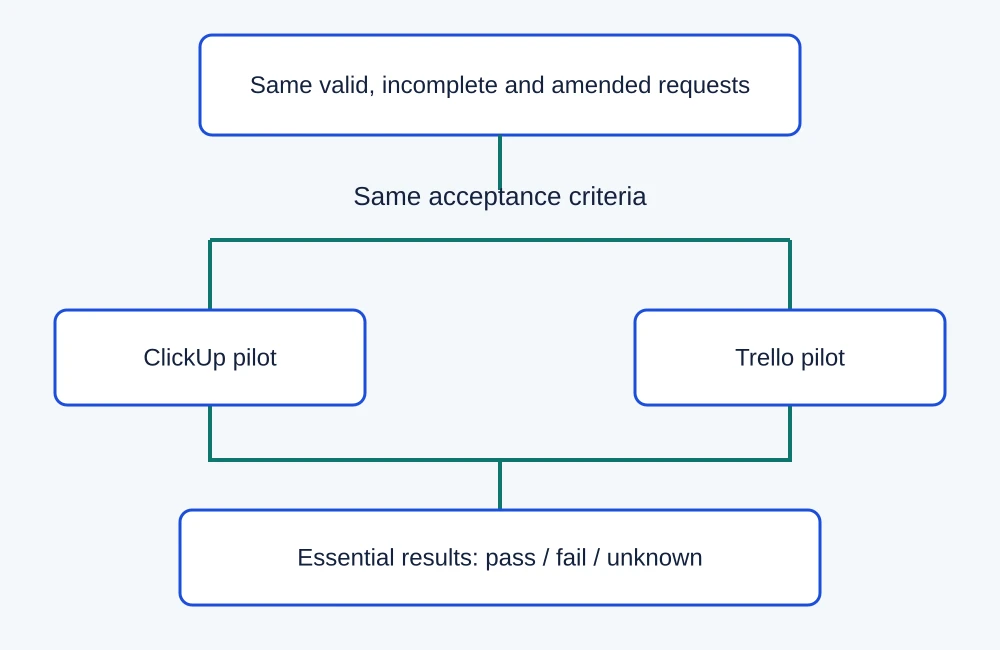
Create three fictional requests: one ready for work, one missing essential detail and one amended after approval. Give each a stable reference. The comparison is whether the intended participants can maintain the decision, not how impressive a prepared demonstration looks.
- Check that the intended reviewer can locate the current work and cannot access prohibited records. A filtered view is not an access boundary.
- Move work into review, then change its owner or version. Observe whether the routine still asks the right person for the right decision.
- Exercise an ordinary update and an uncertain automation outcome. Record the recovery responsibility and result.
- Export a representative record through the intended route and reconcile required fields, relationships and supporting evidence. A file that opens is not proof of a complete exit.
Record tester, date, plan, configuration and actual observations in the software pilot plan. These are proposed checks, not a fresh permission test or performance result for this comparison. Unknown essentials remain unknown until the team obtains suitable evidence.
When switching is worth the disruption
Move only when the new configuration fixes a defined failure. If Trello users repeatedly reconstruct task detail from another register, investigate whether ClickUp can become the maintained record. If a ClickUp configuration has become too elaborate for a bounded queue, test whether a smaller Trello board preserves the important distinctions with less administration.
Before moving, agree which system owns new requests, what happens to unfinished work and when the old source may become read-only. Use the migration checklist to preserve stable references and reconcile the result. Do not delete the old record simply because an import reports success.
If code-linked implementation is the deciding requirement, the GitHub Projects review addresses a different starting situation. If neither product meets the essentials, return to the project-management shortlist rather than forcing a winner.
My recommendation for the example team
For the illustrative six-person team with a bounded shared delivery queue, I would start with Trello and a deliberately small configuration. I would choose ClickUp instead when the pilot demonstrates that richer task structure removes a genuine parallel record and the team can sustain the administration.
Keep that choice conditional on access, usable exit and total cost. A more expensive plan is justified by a requirement it meets; a cheaper plan is useful only if it passes. Complete the pilot before moving everyone.
Sources and image sources
Official identities: ClickUp brand resources and Atlassian trademark guidance.